Import TXT do Access
Create on your desktop a folder (name it however) and put inside a files with 5-6 lines of text in a table form with headers.
First one need to has a separator same as CSV, second contains special character as separator. It can be for example this option: “|” still use in lot of source reports.
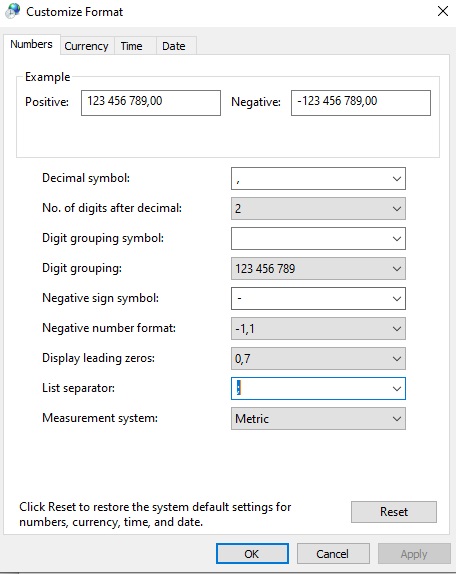
To check what is you current seperator for CSV files go to regional settings -> region –> additional settings –> list separator
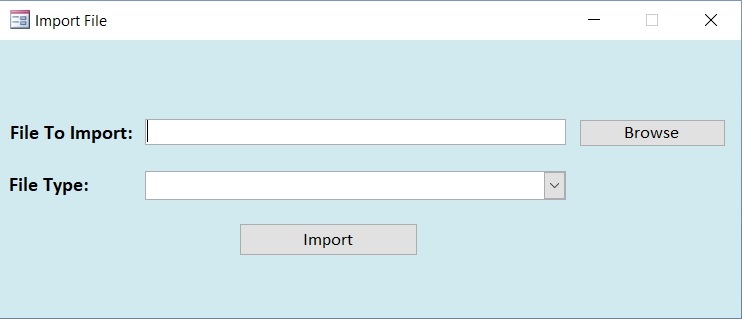
If you are ready with that go ahead and open new database in Access. Design new form, that will get similar structure and layout as below (if you don’t know how to creat form, get a leeson by clicking on forms page or post about Excel import)
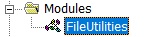
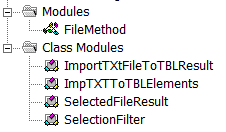
Go to VisualBasic and Inser our first Module, name it: FileUtilities:
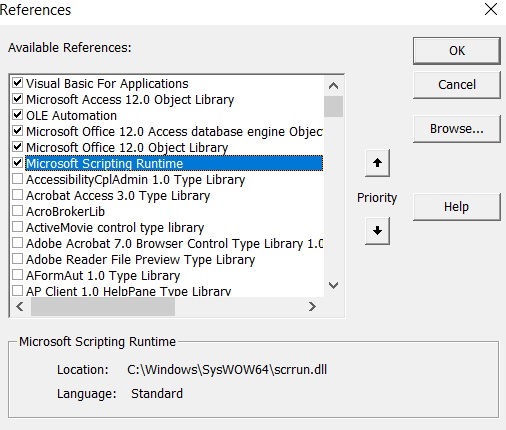
For bottom “Browse” we will choose FileDialog. Rememeber to add required references first:
Ok, time for our favourite part – coding. First function will be about choosing a file from every location we would like to. Instead of String Values for OpenFileDialog entities we have already some Variables. I definied it in a class module and called it SelectedFileResult as follow:
Public Successful As Boolean
Public ErrMsg As String
Public FileName As String
Then I created class SelectionFilter for filters (see the OpenFileDialog method descrbied here):
Public Successful As Boolean
Public ErrMsg As String
Public FileName As String
And that’s how we use class variables in our function
Public Function ToSelectFile(Titl As String, _
MultiSel As Boolean, _
SelectionFilter As SelectionFilter) As SelectedFileResult

Dim ForSelection As FileDialog
Dim item As Variant
Dim Res As New SelectedFileResult

Set ForSelection = Application.FileDialog(msoFileDialogFilePicker)

With ForSelection

    .AllowMultiSelect = MultiSel
    .Title = Titl
    .Filters.Clear
    .Filters.Add SelectionFilter.Dscrpt, SelectionFilter.Xtns

     If .Show Then

       For Each item In .SelectedItems
       Res.Filename = CStr(item)
       Res.Successful = True
       Next
      Else:
       Res.Successful = False
       Res.ErrMsg = "No File Selected!"
       'OpenFileDialog = CStr(item)

     End If
  End With

Set ToSelectFile = Res

End Function
Now we need to create a solution that will import our files. For this function we need to create also some classes. Name them and declare:
'ImportTXtFileToTBLResult

Public Success As Boolean
Public ErrorMessage As String

'and ImpTXTToTBLElements

Public SpecName As String
Public TBLName As String
Public FileName As String
Public HasHeaders As Boolean
Public Function ImpTXTFileToTBL(Elems As ImpTXTToTBLElements)
As ImportTXtFileToTBLResult
Dim Res As New ImportTXtFileToTBLResult
Dim fso As New FileSystemObject
Dim txt As TextStream
Dim Fdata As String
Dim sep As String

On Error GoTo ImportFails

If Not fso.FileExists(Elems.FileName) Then
        Res.Success = False
        Res.ErrorMessage = "File Not Found!"
        Set ImpTXTFileToTBL = Res
        Exit Function
End If

Set txt = fso.OpenTextFile(Elems.FileName, ForReading)
Fdata = txt.ReadAll
txt.Close

sep = DLookup("FieldSeparator", "MSysIMEXSpecs", _
"SpecName='" & Elems.SpecName & "'")
If InStr(1, Fdata, sep) = 0 Then
Res.Success = False
Res.ErrorMessage = "Incorrect import type"

Set ImpTXTFileToTBL = Res
Exit Function

End If

DoCmd.TransferText acImportDelim, Elems.SpecName, _
Elems.TBLName, Elems.FileName, Elems.HasHeaders

Res.Success = True
Set ImpTXTFileToTBL = Res
Exit Function

ImportFails:
    Res.Success = False
    'Res.ErrorMessage = "Unable to Import File"
    Res.ErrorMessage = Err.Dscrption

    Set ImpTXTFileToTBL = Res

End Function
Whoa, this funtion is quite long, isn’t it?
Ok, but we need to get back to our form and see what else need to be done. Well we need to input codes for browse and import. Let’s do it.
Browse button:
Private Sub btnBrowse_Click()

    Dim SelFilter As New SelectionFilter
    Dim Res As SelectedFileResult
    SelFilter.Dscrpt = "Delim. Files"
    SelFilter.Xtns = "*.csv, *.txt"

    Set Res = FileMethod.ToSelectFile _
    ("Select a file to import", False, SelFilter)

    If Res.Successful Then

        Me.txtFileName = Res.FileName
        Me.txtErrorMSG = Null
    Else:

        Me.txtErrorMSG = Res.ErrMsg

    End If
End Sub
Import button:
Private Sub btnImport_Click()
    'import file
    Dim Res As ImportTXtFileToTBLResult
    Dim Param As New ImpTXTToTBLElements

    Me.txtErrorMSG = Null

    If IsNull(Me.txtFileName) Then

        Me.txtErrorMSG = "Please select a file!"
        Exit Sub
    End If

    If IsNull(Me.cboFileType) Then

        Me.txtErrorMSG = "Please select a file type!"
        Exit Sub
    End If

    Param.FileName = Me.txtFileName
    Param.HasHeaders = True
    Param.SpecName = Me.cboFileType
    Param.TBLName = "ExampleData"

    Set Res = FileMethod.ImpTXTFileToTBL(Param)

    If Res.Success Then
        MsgBox "File was succesfully imported!", vbOKOnly, "Succes"

    Else
        Me.txtErrorMSG = Res.ErrorMessage
    End If

End Sub
 Heart4DataScience