Machine learning (ML) is a core branch of artificial intelligence (AI), and libraries like TensorFlow and Keras provide tools for creating, training, and deploying models that learn from data.
Keras
Keras is a high-level library for creating and training neural networks. It was released in March 2015 by François Chollet with the goal of simplifying the development of machine learning models. Initially, Keras did not perform computations on its own. It operated as an interface to other computational libraries such as TensorFlow, Theano, and CNTK. This allowed developers to focus on model design without worrying about the implementation details of the learning algorithms. Over time, Keras has become an integral part of TensorFlow and is currently most commonly used through the tf.keras module.
TensorFlow
TensorFlow is an open-source machine learning platform developed by Google Brain and publicly released in version 1.0 in November 2015. The name comes from the concept of tensors, multidimensional data structures used to store and process information in machine learning models. TensorFlow provides the mechanisms necessary for performing numerical computations, calculating gradients, training models, and utilizing GPUs and TPUs to accelerate computation. It is the foundation upon which modern artificial intelligence systems are built, such as neural networks for image classification, text analysis, and speech recognition.
In practice, TensorFlow is responsible for performing the computations and training the model, while Keras provides a convenient interface for easily defining the neural network architecture. By combining both tools, advanced AI models can be created with relatively little code. Google released an updated version of TensorFlow 2.0 in September 2019.
The latest versions od Keras and TF:
| Library | Latest Stable Version | Release Date |
|---|---|---|
| TensorFlow | 2.21.0 | March 6th 2026 |
| Keras | 3.14.1 | May 7th 2026 |
Let’s start by installing Keras.
pip install keras
After successful installation, which shouldn’t take long, my suggestion is to proceed to installing Tensoflow immediately. In this case, the full installation may take a bit longer. For me, the entire process (both libs) took about 12 minutes.
pip install tensorflow
Now let’s check the correct installation of keras.
import keras

print("Keras version:", keras.__version__)
print("Backend:", keras.backend.backend())
Keras version: 3.12.2
Backend: tensorflow
# simple CNN
from keras.models import Sequential
from keras.layers import Dense

model = Sequential([
    Dense(10, activation='relu', input_shape=(5,)),
    Dense(1, activation='sigmoid')])

model.summary()
Model: “sequential”
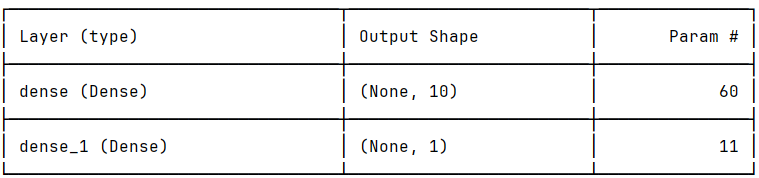
Total params: 71 (284.00 B)
Trainable params: 71 (284.00 B)
Non-trainable params: 0 (0.00 B)
import tensorflow as tf
print("TensorFlow version:", tf.__version__)
TensorFlow version: 2.21.0
print(tf.config.list_physical_devices())
[PhysicalDevice(name=’/physical_device:CPU:0′, device_type=’CPU’)]
print("GPU devices:", tf.config.list_physical_devices('GPU'))
GPU devices: []
TensorFlow currently uses GPUs primarily through CUDA, meaning it requires NVIDIA cards. If your computer is equipped with Intel Graphics or AMD Radeon TF on Windows typically won’t use them as GPUs for model training.
You can easily check your card model while remaining in the Python environment, all you need is a platform library that does not require installation.
import platform
print(platform.platform())
Windows-10-10.0.26200-SP0
And one more way to verify GPU and CUDA on your computer
print("Built with CUDA:", tf.test.is_built_with_cuda())
print("GPU available:", tf.config.list_physical_devices('GPU'))
Built with CUDA: False
GPU available: []
In my case the result will be false and the list will be empty because I do not have NVIDIA and CUDA/cuDNN configured.
CUDA (Compute Unified Device Architecture) This is the NVIDIA “language”/platform that allows programs (e.g., TensorFlow) to use the GPU. With CUDA, TensorFlow can send computations to the graphics card.
cuDNN (CUDA Deep Neural Network Library) – This is a library with ready-made, very fast implementations of deep learning operations: convolutions (CNN), activations, RNN / LSTM, batch normalization
How it works together (simple model): TensorFlow –> CUDA (controls the GPU) –> cuDNN (optimizes neural networks) –> (your) NVIDIA card
However, we have a solution in the form of Google Colab, which provides us with:
an NVIDIA GPU,
no CUDA installation required,
a ready-made TensorFlow/PyTorch environment,
and runs in a browser.

