Following my recent posts, in which I showed basic functions and methods of working with datasets available in sklearn and seaborn, I was thinking about the summary in the form of a universal data handling program. Designed in a way, where user can choose the source to download the dataset, then indicate the data to work with on and finally, by selecting appropriate columns, perform basic calculations to finally present it in a graphical form.
Start with defining functions. The first function will be used to select the source for downloading the dataset. With the knowledge from previous posts, dataset load option depends on the source. In Scikit-learn, Seaborn and Pandas for Datasets I desribed 2 methods depends on dataset source:
#sklearn
print(dir(datasets))
dt_sklearn = dir(datasets)

#seaborn
print(sns.get_dataset_names())
According the above, we moght build a function verifying the correctness of the entered source.
But first: imports, sklearn and seaborn.
import seaborn as sns
from sklearn import datasets
A function to check, if source of dataset is available:
def is_source_available(source):
    if source == "seaborn":
        return sns.get_dataset_names()
    elif source == "sklearn":
        return dir(datasets)
    else:
        raise ValueError("Unknown source. "
                         "Available: 'seaborn', 'sklearn'.")
An execute with input method, simple loop (while True) and try/except block.
while True:
    # source chechinkg
    source_name = input(
        "Provide the source of the dataset"
        "('seaborn' or 'sklearn' or type 'end' "
        "to exit): ").lower()
    try:
        if source_name.lower() == 'exit':
            print("End")
            break
    # list of datasets in selected source
        elif is_source_available(source_name):
            print(f"\nSource: '{source_name}' type correct. ")
            print(f"\nAvailable datasets in {source_name}: ")
            if source_name == "seaborn":
                print(sns.get_dataset_names())
            elif source_name == "sklearn":
                sklearn_datasets =  dir(datasets)
                ds_name = [name for name in sklearn_datasets]
                print(ds_name)

    except Exception as e:
        print("Something went wrong", [e])
Check the use.

Python function dir(datasets) dedicated for sklearn returns a little unreadable list of datasets. If we dive in every element of this result, we will find out, that the list of real, useable datasets is actually much shorter and basically focuses on a few of them only (like: iris, wine or breast_cancer), from which we might create an internal list.
Let’s make a change in this line of code:
 elif source_name == "sklearn":
                sklearn_datasets =  dir(datasets)
by adding interlnal list instead of dir(datasets).
sklearn_datasets = ["iris", "digits", "wine", "breast_cancer"]
Time for second function. To check if dataset was typed properly.
def is_dataset_available(name, source):
    if source == "seaborn":
        return name in sns.get_dataset_names()
    elif source == "sklearn":
        sklearn_datasets = ["iris",
                            "digits",
                            "wine",
                            "breast_cancer"]
        return name in sklearn_datasets
    else:
        raise ValueError("Unknown source. "
                         "Available: 'seaborn', 'sklearn'.")
Add math, pandas nad numpy libraries:
import pandas as pd
import numpy as np
import math
Next is a function to load the dataset ragarding selected source.
def load_dataset(dataset_name, source_name):
   # seaborn
    if source_name == "seaborn":
        return sns.load_dataset(dataset_name)
    #sklearn
    elif source_name == "sklearn":
        if dataset_name == "iris":
            data = datasets.load_iris()
        elif dataset_name == "digits":
            data = datasets.load_digits()
        elif dataset_name == "wine":
            data = datasets.load_wine()
        elif dataset_name == "breast_cancer":
            data = datasets.load_breast_cancer()
        else:
            raise ValueError(f"Dataset '{dataset_name}' "
                             f"is not supported in sklearn")

        return pd.DataFrame(data.data,
                            columns=data.feature_names
                            if hasattr(data, 'feature_names')
                            else None)
    else:
        raise ValueError("Unknown source. "
                         "Available: 'seaborn', 'sklearn'.")
And in use:
            dataset_name = input("\nEnter the name of the dataset "
                                 "from selected source "
                                 "(or type 'end' to exit): ")
            if dataset_name.lower() == 'exit':
                print("End of processing. Bye!")
                break

            # check if dataset exist
            elif is_dataset_available(dataset_name,source_name):
                print(f"\nDataset: '{dataset_name}' type correct. ")

                # load  database
                df = load_dataset(dataset_name, source_name)
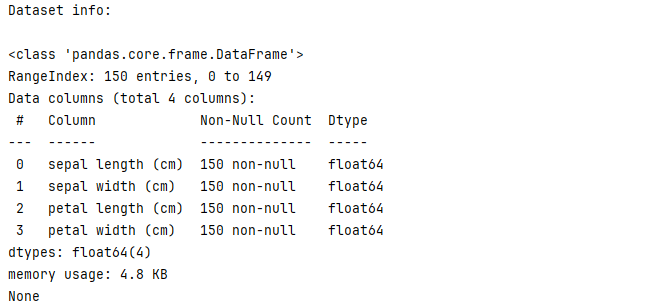
                print("\nDataset info:\n")
                print(df.info())
Besides basic information about the selected dataset, I would like to check a few simple functions like info, describe, isna counts, etc.:
# print first, last as part of df data
print(f"\nDataset part view:\n"
      f"{pd.concat((df.head(2),
                    df.tail(2)))}")

# basic stats
print(f"\nDataset basic summary info:\n "
      f"{df.describe()}")

# Check for missing values
print(f"\nCheck for missing values:\n"
      f"{df.isna().sum()}")
And then create a view of the selected columns as new dataframe.
try:
    indexes = [int(idx.strip()) for idx in
               column_indexes.split("/")]
    df = df.iloc[:, indexes]

    print("\nNew dataframe created:\n")
    print(df)
    print("\nNew dataframe info:\n")
    print(df.info())
With my new dataframe, I would like to perform regression, add a forecast column and present the result of the trained model in a graphical form.I need to add the following references and libraries:
from sklearn import datasets, preprocessing, svm
from sklearn.model_selection import (cross_validate,
                                     train_test_split)
from sklearn.linear_model import LinearRegression
and matplotlib:
import matplotlib.pyplot as plt
from matplotlib import style

style.use('dark_background')
df['forecast'] = np.nan

last_value = df.iloc[-1].name
add_value = int(input(
                            "\nEnter the forecasting "
                            "index value: "))
next_value = last_value + add_value

for i in forecast_set:
    next_value += add_value
    df.loc[next_value] = [np.nan for _ in range
    (len(df.columns) - 1)] + [i]

# graph
col = df.iloc[:, indexes[:1]]
col.plot()
df['forecast'].plot()
plt.legend(loc=4)
plt.xlabel(col)
plt.ylabel(column_name)
plt.title(f"Result for trainings on {source_name} "
          f"dataset:{dataset_name} ")
plt.show()
How it works?
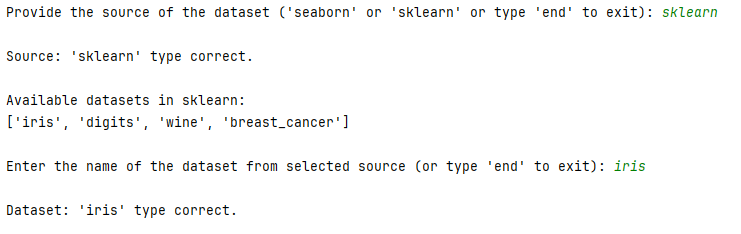
Check for iris
Providing sklearn source and iris dataset.
Basic information about selected dataset.

Selecting columns from iris to create new dataframe.

Type label y:


Adding label column:

df[‘label’] = forecast_col * 1.1
print(f”forecast_out: {forecast_out}”)
print(f”accuracy: {accuracy}”)
print(f”forecast_set: {forecast_set}”)

Check for taxis.




Full code:
We can expand list of datasets sources by adding f.e. tensorflow. Below is a part of the code, that might be adapted to verify the source, name of the dataset, and then load the data:
def load_tensorflow_dataset(name):
    try:
        dataset, info = tf.keras.utils.get_file(name,
                                                origin=None,
                                                untar=True)
        return pd.DataFrame(dataset)
    except Exception:
        raise ValueError("Unknown TensorFlow dataset.")
We can also extend our functions by loading a dataset from outside, e.g. in .csv format.
import os
To our function is_dataset_available we need to add folllowing code lines:
elif source  == "csv":
        return os.path.isfile(dataset_name)
And to function load_dataset (after return pd.DataFrame and before last else: raise ValueError)
elif source_name == "csv":
        try:
            return pd.read_csv(dataset_name)
        except Exception as e:
            raise ValueError(f"Failed to load .csv file : {e}")
 Heart4DataScience