How to import and read line by line text file in Python?
I shared some ideas on my website, like the simplest way of Read Files or using libraries: OS, Linecache. When I asked the same question on ChatGPT I received this:
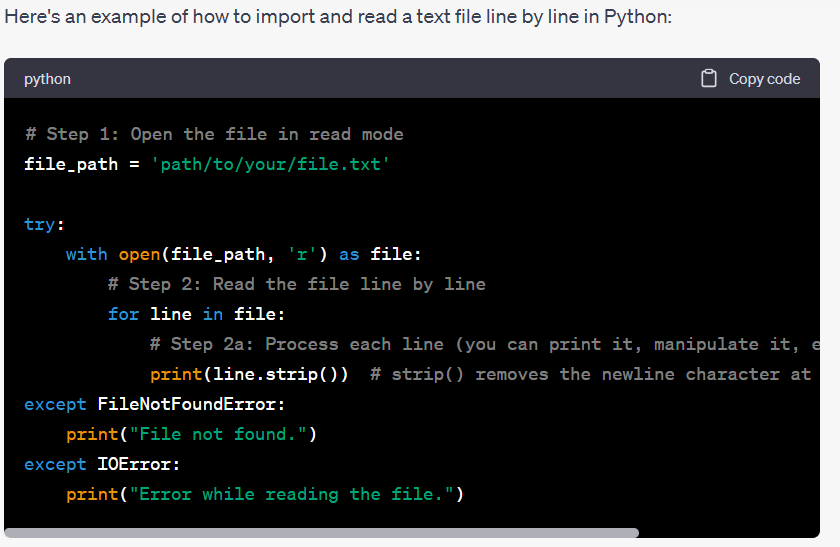
AI desribed really deeply all the details:
In this example, we use a with statement, which is a context manager, to open the file. This ensures that the file is automatically closed after the with block, even if an exception occurs. Make sure to replace ‘path/to/your/file.txt’ with the actual path to your text file. The line.strip() method is used to remove the newline character (\n) at the end of each line, which is added by default during reading. You can process each line as needed inside the loop. Remember to handle exceptions (e.g., FileNotFoundError and IOError) that may occur if the file does not exist or if there are issues with reading the file.
Source: chat.openai.com
I needed to operate on data after import and I asked:
how to import only last column from text file in Python?
AI showed me another sample of a code, which I used, but modified a little to suit it my case:
file_path = 'Movies.txt'

years = []

try:
    with open(file_path, 'r') as file:
        for line in file:
            columns = line.strip().split('\t')
            year = columns[-1]
            years.append(year)
except FileNotFoundError:
    print("File not found.")
except IOError:
    print("Error while reading the file.")
Then I tested some operations on it by myself:
print(years)
print(type(years))
tpl = tuple(years[1:10])
print(tpl)
print(max(tpl),min(tpl))
print(len(tpl))
print(len(years))

import statistics

print(statistics.median(tpl))
print(statistics.median(years))
And the final inquiry to AI in this topic: how to export as an Excel file in Python?
Offered me something like this (modified to my example):
import pandas as pd
# Create a DataFrame from the list of ages
data_frame = pd.DataFrame({'ReleaseYear': years})

# Export the DataFrame to an Excel file
data_frame.to_excel('D:\ReleaseYear.xlsx', index=False)

print("Data exported to Excel successfully.")
Must say that chatGPT might be useful as long as you know, what you searching for and have some basic knowledge to understand it and modify it by yourself. And what is important nowadays, also in other categories than programming, stay strong with your own rules and standards to keep distance to all you will get from AI 🙂
 Heart4DataScience