PART I – IMPORT
1.Create Form
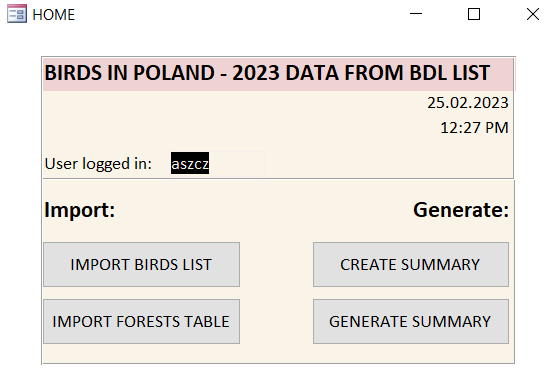
Private Sub Form_Load()
'Log in
UserId = VBA.Environ("USERNAME")

Me.tUserLogin = UserId
End Sub
2.Module: Import
Variables to declare in module Import
Option Compare Database
Option Explicit

Dim of As Office.FileDialog
Dim FilePath As Variant
Dim FileName As String
Dim TableName As String
1 – Create Functions
a) Funtion to import one or more sheets from selected file
Public Function GetSheetsFrom(sFileName As Variant, _
sTableName As String) As String

Dim obExcel As New Excel.Application
Dim wbk As Excel.Workbook
Dim wst As Object
Dim sUsedRange As String

Set wbk = obExcel.Workbooks.Open(sFileName)

For Each wst In wbk.Worksheets

    sUsedRange = wst.UsedRange.Address(0, 0)
    DoCmd.TransferSpreadsheet acImport, acSpreadsheetTypeExcel12, _
    sTableName, sFileName, True, wst.Name & "!" & sUsedRange

Next

wbk.Close
Set wbk = Nothing

obExcel.Quit
Set obExcel = Nothing

Exit Function
End Function
b) Function to check if table exists and deletes previous one from database
Public Function TableExist(TableName As String) As Boolean

Dim db As Database
Dim tbl As TableDef

TableExist = False

Set db = CurrentDb

For Each tbl In db.TableDefs

    If tbl.Name = TableName Then
    TableExist = True
    Exit For
    End If

Next

Set db = Nothing

End Function

Public Function TableDel(TableName As String) As Variant

    DoCmd.DeleteObject acTable, TableName
    MsgBox "Table: " & TableName & " deleted", vbInformation

End Function
2 – Import procedures
a) Import one file with multisheets
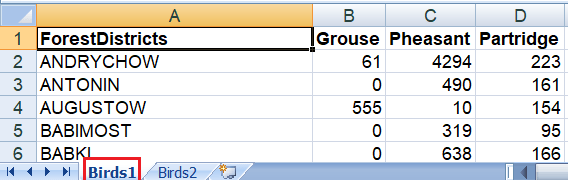
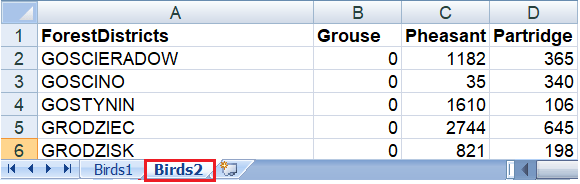
File to import: Birds listed in Excel, split in 2 sheets with same columns.
Birds1 has 101 records (with headers), Birds2:330 rows(with headers)
Public Sub ImportBirds()
Dim BirdsFile As Variant

On Error GoTo ErrDesc

TableName = "birds"

'Deleting prvs table with self declared function TableExist
If TableExist(TableName) = True Then TableDel (TableName)

Set of = Application.FileDialog(msoFileDialogFilePicker)

With of

    .InitialFileName = CurrentProject.Path
    .AllowMultiSelect = True
    .Title = "Please select a Report:"
    .Filters.Clear
    .Filters.Add "Custom Excel Files", "*.xls, *.xlsx"

 If .Show = True Then

    For Each BirdsFile In .SelectedItems
    GetSheetsFrom BirdsFile, TableName
    Next
    MsgBox "File: " & Dir(.SelectedItems(1)) & _
    " successfully imported.", vbInformation

 End If

End With

Set of = Nothing

Exit Sub


ErrDesc:
MsgBox Err.Description, vbExclamation
Exit Sub

End Sub
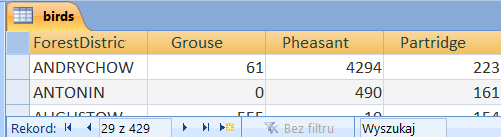
Final result in MS Access is one table created from all Excel sheets in selected file. And headers are not repeated.
b) Import multifiles, but one sheet
Import only first sheet, but able to slected more than one file
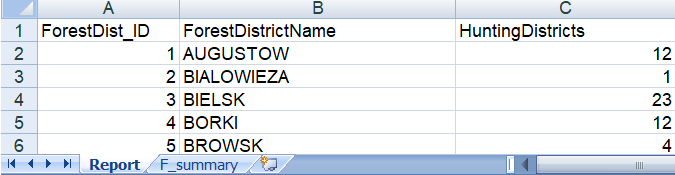
Sub ImportForests()

On Error GoTo ErrDesc

TableName = "forests"

If TableExist(TableName) = True Then TableDel (TableName)

Set of = Application.FileDialog(msoFileDialogFilePicker)

With of

    .InitialFileName = CurrentProject.Path
    .AllowMultiSelect = True
    .Title = "Please select Files: "
    .Filters.Clear
    .Filters.Add "Custom Excel files", "*.xls*,*xlsx*"

 If .Show = True Then
    For Each FilePath In .SelectedItems

        FileName = Dir(FilePath)

        If Left(FileName, 7) <> TableName Then
        MsgBox "One or more of selected files are wrong, " & _
       "try once again", _
        vbCritical

        TableDel (TableName)
        Exit Sub

        Else:
        DoCmd.TransferSpreadsheet acImport, _
        acSpreadsheetTypeExcel12, TableName, _
        FileName, True
        MsgBox "File: " & FileName & " successfully imported.", _
        vbInformation
        End If

    Next

 End If
End With

Set of = Nothing

Exit Sub

ErrDesc:
MsgBox Err.Description, vbExclamation
Exit Sub

End Sub
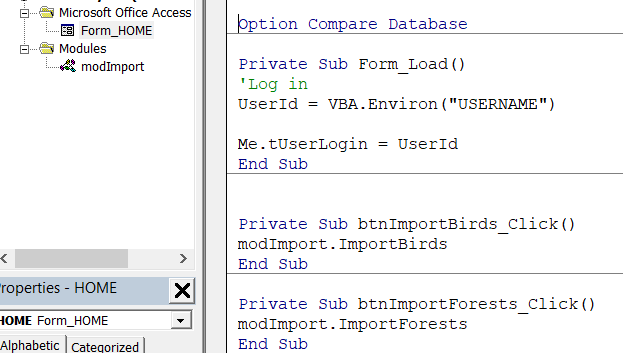
3- call from buttons
Private Sub btnImportBirds_Click()
modImport.ImportBirds
End Sub

Private Sub btnImportForests_Click()
modImport.ImportForests
End Sub
Full code below:
PART II – GENERATE
3. Module: Generate
Variables to declare in module Generate
Option Compare Database

Dim sSQL As String
Dim qry As QueryDef
Dim db As Database

Dim QueryName As String
1 – Create Functions
Familiar to the module Import, where we checked if table existed and deleted, do the same for query:
Public Function QueryExist(QueryName As String) As Boolean

Dim db As Database
Dim qry As QueryDef

QueryExist = False

Set db = CurrentDb

For Each qry In db.QueryDefs

    If qry.Name = QueryName Then
    QueryExist = True
    Exit For
    End If

Next

Set db = Nothing

End Function

Public Function QueryDel(QueryName As String) As Variant

    DoCmd.DeleteObject acQuery, QueryName
    MsgBox "Query: " & QueryName & " deleted", vbInformation

End Function
2 – Create Query
Create Query, which based on inner join sql statement for tables: birds and forests. Adding new column ‘Costs” to the query, that is simple math expression: sum of columns with birds names /divided by column with hunting districts * multiplied by number of Querters and round in 2 places after comma.
Sub CreateQuery()

On Error GoTo ErrNote

QueryName = "Summary"

If QueryExist(QueryName) = True Then QueryDel (QueryName)

Set db = CurrentDb

sSQL = "SELECT birds.[ForestDistricts]," & _
       "birds.[Grouse]," & _
       "birds.[Pheasant]," & _
       "birds.[Partridge], " & _
       "forests.[HuntingDistricts]," & _
       "Round((birds.[Grouse]+birds.[Pheasant]" & _
        "+birds.[Partridge]/forests.[HuntingDistricts]* 4),2)" & _
        "as [Costs]" & _
       "FROM [birds] INNER JOIN forests " & _
       "ON birds.[ForestDistricts] " & _
        "= forests.[ForestDistrictName]"

Set qry = db.CreateQueryDef(QueryName, sSQL)

MsgBox QueryName & " query successfully created.", _
        vbInformation

DoCmd.OpenQuery QueryName, , acReadOnly

Exit Sub

ErrNote:
MsgBox Err.Description

End Sub
3 – Export to Excel file
Generate data to Excel File with current date
Sub GenerateExcelFile()

Dim CurrenDate As String
CurrentDate = Format(Now(), "_yyyymmdd_hhmmss")

MsgBox CurrentDate

QueryName = "Summary"
DoCmd.OutputTo acOutputQuery, QueryName, acFormatXLSX, _
QueryName & CurrentDate & ".xlsx", True

DoCmd.Close acForm, QueryName, acSaveYes

End Sub
4 – call from buttons
Private Sub btnQuery_Click()
modGenerate.CreateQuery
End Sub

Private Sub btnGenerate_Click()
modGenerate.GenerateExcelFile
End Sub
Full code below:
 Heart4DataScience