However you will try to learn SQL from the beginning, you will find an examples of how to insert data into created tables, like here:
insert into ForestDistricts
 values
(1, 'AUGUSTOW', 12),
And some examples of how to modify existing tables and the values in the columns, using: ‘add, drop, delete and update’ methods for selected rows sometimes with where condition.
Alter table LargeWild
Alter column ...

Update LargeWild
Set ....
But what to do if I want to insert data with one query in freshly added column?
I was searching on the internet for some methods and found not enough. Even asked AI.
But all of the results boiled down to one bassic option: need to set it line by line.
Well, I don’t want to import data from any other file to make it easier, but also tired of typing insert values over and over again.
Tried this. Based on data I had, I convert it to CSV file with comma separator, adding extra column at first and at the end of data, and copy data directly from file to other query.
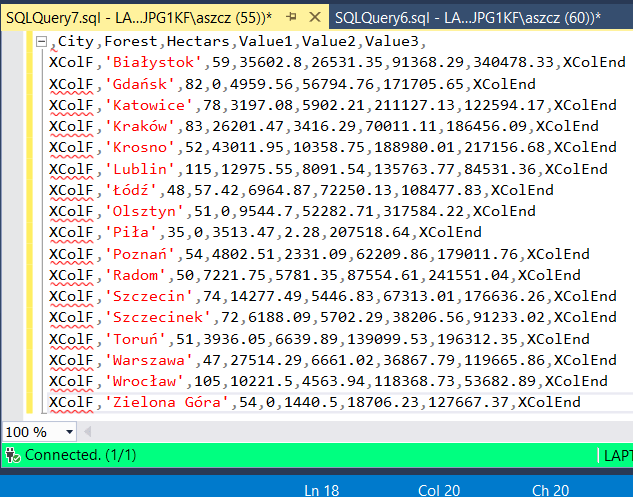
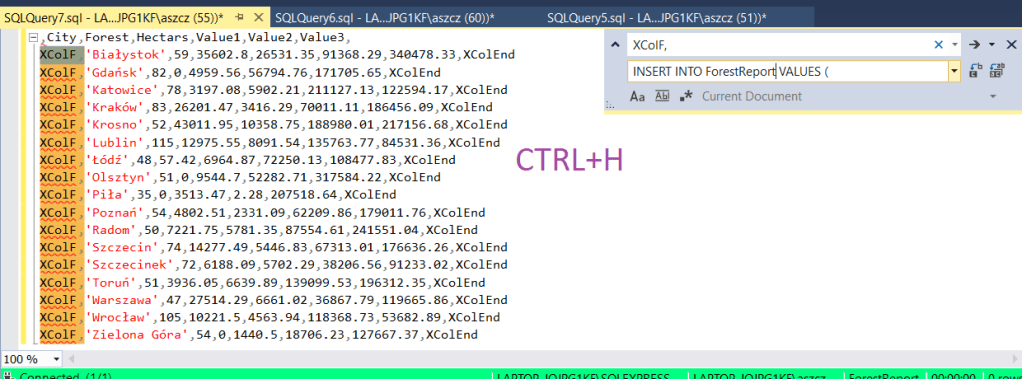
Select first row and copy into query, where I created SQL table. No executing, go further, to prepare all inserts. There is 17 lines exluding headers. So I tried this: replace all values in the first column from XColF into ‘ INSERT INTO ForestReport VALUES ( ‘ and ‘ XColEnd ‘ into );
Now I want to add new column and data for each row . I know there is autonumration for first column: F_ID. I will use it as a condition of where in last column of external CSV file:
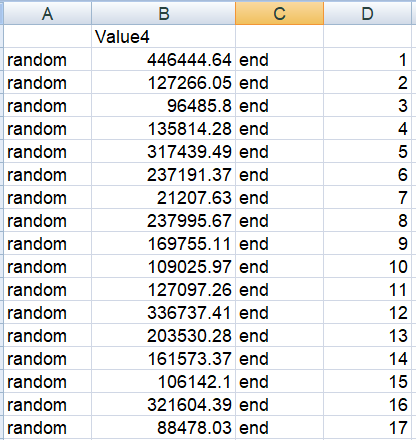
Change word random into ‘update Report_RL set Value4 = ‘ , last word end into ‘ where F_ID = ‘
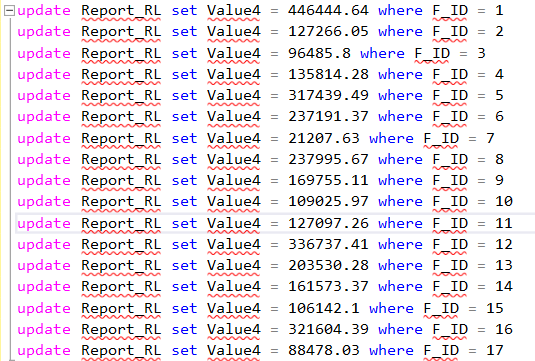
SQL query below:
Create database Reports

GO

Use Reports

GO

create table Report_RL(
F_ID int identity(1,1) not null,
City varchar(255) not null,
FCounter int not null,
Hectars numeric (38,4) not null,
Value1 decimal (38,2) not null,
Value2 decimal (38,2) not null,
Value3 decimal (38,2) not null
)
GO

INSERT INTO Report_RL VALUES ('Białystok',59,35602.8,26531.35,91368.29,340478.33);
INSERT INTO Report_RL VALUES ('Gdańsk',82,0,4959.56,56794.76,171705.65);
INSERT INTO Report_RL VALUES ('Katowice',78,3197.08,5902.21,211127.13,122594.17);
INSERT INTO Report_RL VALUES ('Kraków',83,26201.47,3416.29,70011.11,186456.09);
INSERT INTO Report_RL VALUES ('Krosno',52,43011.95,10358.75,188980.01,217156.68);
INSERT INTO Report_RL VALUES ('Lublin',115,12975.55,8091.54,135763.77,84531.36);
INSERT INTO Report_RL VALUES ('Łódź',48,57.42,6964.87,72250.13,108477.83);
INSERT INTO Report_RL VALUES ('Olsztyn',51,0,9544.7,52282.71,317584.22);
INSERT INTO Report_RL VALUES ('Piła',35,0,3513.47,2.28,207518.64);
INSERT INTO Report_RL VALUES ('Poznań',54,4802.51,2331.09,62209.86,179011.76);
INSERT INTO Report_RL VALUES ('Radom',50,7221.75,5781.35,87554.61,241551.04);
INSERT INTO Report_RL VALUES ('Szczecin',74,14277.49,5446.83,67313.01,176636.26);
INSERT INTO Report_RL VALUES ('Szczecinek',72,6188.09,5702.29,38206.56,91233.02);
INSERT INTO Report_RL VALUES ('Toruń',51,3936.05,6639.89,139099.53,196312.35);
INSERT INTO Report_RL VALUES ('Warszawa',47,27514.29,6661.02,36867.79,119665.86);
INSERT INTO Report_RL VALUES ('Wrocław',105,10221.5,4563.94,118368.73,53682.89);
INSERT INTO Report_RL VALUES ('Zielona Góra',54,0,1440.5,18706.23,127667.37);

alter table Report_RL
add Value4 real

GO

update Report_RL set Value4 = 446444.64 where F_ID = 1
update Report_RL set Value4 = 127266.05 where F_ID = 2
update Report_RL set Value4 = 96485.8 where F_ID = 3
update Report_RL set Value4 = 135814.28 where F_ID = 4
update Report_RL set Value4 = 317439.49 where F_ID = 5
update Report_RL set Value4 = 237191.37 where F_ID = 6
update Report_RL set Value4 = 21207.63 where F_ID = 7
update Report_RL set Value4 = 237995.67 where F_ID = 8
update Report_RL set Value4 = 169755.11 where F_ID = 9
update Report_RL set Value4 = 109025.97 where F_ID = 10
update Report_RL set Value4 = 127097.26 where F_ID = 11
update Report_RL set Value4 = 336737.41 where F_ID = 12
update Report_RL set Value4 = 203530.28 where F_ID = 13
update Report_RL set Value4 = 161573.37 where F_ID = 14
update Report_RL set Value4 = 106142.1 where F_ID = 15
update Report_RL set Value4 = 321604.39 where F_ID = 16
update Report_RL set Value4 = 88478.03 where F_ID = 17

GO

select * from Report_RL
 Heart4DataScience