Sub ImportExcelSheet()
Dim Wind As FileDialog
'Variable for Sheet "Offer"
Dim OFFsheet As Worksheet
'Variable for file with Sheet "Products"
Dim PRDFile As String

'-- Selecting file
Application.ScreenUpdating = False
Set OFFsheet = Sheets("Offer")
Set Wind = Application.FileDialog(msoFileDialogOpen)

With Wind
.Title = "Search for file Products.xls(x)"
.InitialView = msoFileDialogViewDetails
.InitialFileName = ActiveWorkbook.Path
.Filters.Clear
.Filters.Add "All files", "*.*"
.Filters.Add "Plik xls", "*.xls, *.xlsx", 1

If .Show = True Then
    PRDFile = .SelectedItems(1)
End If
End With

Set Wind = Nothing

'---Copy data
If PRDFile = "" Then Exit Sub
Workbooks.Open (PRDFile)
OFFsheet.Visible = xlSheetVisible

ActiveSheet.UsedRange.Select
Selection.Copy
OFFsheet.Range("A1").PasteSpecial xlPasteValues

Application.CutCopyMode = False
ActiveWorkbook.Close (0)

'--Formatting report

OFFsheet.Select
ActiveSheet.Cells.EntireColumn.AutoFit
Range("A1").Select

Set OFFsheet = Nothing

Application.ScreenUpdating = True

MsgBox "Import data to Sheet 'Offer' completed", _
vbInformation

End Sub
Year: 2021
[VBA] Access export data
Long time since my last post with VBA, so time for a little refreshment.
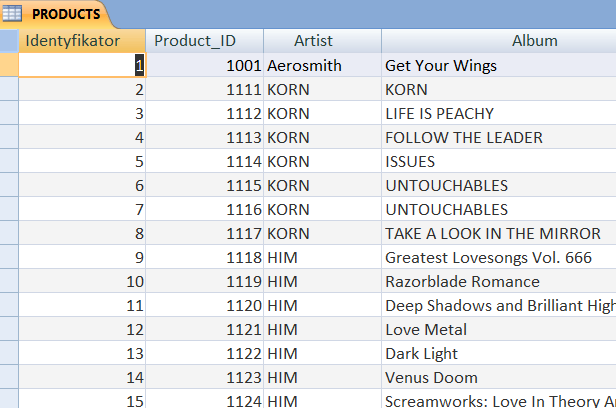
Let’s create simple procedure with export methods from Acces to dedicated path:
Sub ExportFiles()

Dim ExpFilePath As String
Dim ExpFileName As String

On Error GoTo EmptySpace

ExpFilePath = "C:\Users\Agnieszka\Desktop\ExpFiles\"
ExpFileName = "Content" & Format(Now(), _
"_ddmmyyyy_hhmmss")

'SPACE FOR EXPORT METHODS

EmptySpace:
If Err.Number = 2302 Then
MsgBox "Catalog does not exist!", _
vbInformation

End Sub
- Export to Excel
- Export to Txt file with encoding method
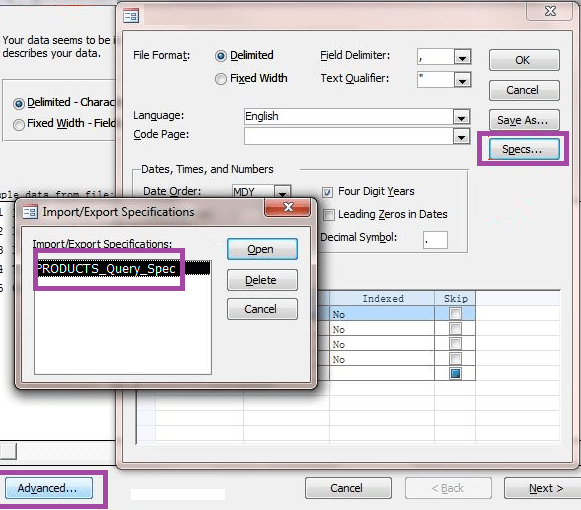
- Export to CSV (with sepcified method)
'EXCEL FILE
DoCmd.OutputTo acOutputTable, "PRODUCTS", acFormatXLSX, _
ExpFilePath & ExpFileName & ".xlsx", False
'TXT FILE
DoCmd.OutputTo acOutputTable, "PRODUCTS", acFormatTXT, _
ExpFilePath & ExpFileName & ".txt", False, , 65001
'CSV FILE
DoCmd.TransferText acExportDelim, "PRODUCTS_Query_Spec", _
"PRODUCTS", ExpFilePath & ExpFileName & ".csv", True
To specify the method we should create at first manually export in our current Acces database, go to Advanced and name it:
Full code:
Sub ExportFiles()

Dim ExpFilePath As String
Dim ExpFileName As String

On Error GoTo EmptySpace

ExpFilePath = "C:\Users\Agnieszka\Desktop\ExpFiles\"
ExpFileName = "Content" & Format(Now(), _
"_ddmmyyyy_hhmmss")

'EXCEL FILE
DoCmd.OutputTo acOutputTable, "PRODUCTS", acFormatXLSX, _
ExpFilePath & ExpFileName & ".xlsx", False
'TXT FILE
DoCmd.OutputTo acOutputTable, "PRODUCTS", acFormatTXT, _
ExpFilePath & ExpFileName & ".txt", False, , 65001

'CSV FILE
DoCmd.TransferText acExportDelim, "PRODUCTS_Query_Spec", _
"PRODUCTS", ExpFilePath & ExpFileName & ".csv", True

EmptySpace:
If Err.Number = 2302 Then
MsgBox "Catalog ExpFile does not exist!", _
vbInformation

End Sub
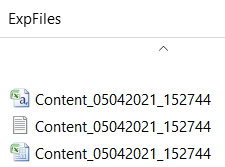
Result:
 Heart4DataScience