Sets & Dictionaries

There are another two types of data collection in Python:
1) Set, which is unordered and unindexed
and
2) Dictionary, which is also unordered, changeable but indexed. Both with no duplicate members.

SETS

#Sets

St1 = {6,10,5,1,9,4}
St2 = {"Ford", "Toyota", "Opel", "Suzuki"}
St3 = set((1,3,3,5,5,5,9,9,9,9))

print(St1)
print(St2)
print(len(St3)

L1 = list(S3)
Count_dup = {i:L1.count(i) for i in L1}
print(L1)

#Operations
St2.add("Audi") #cannot add more than one elem

#if we will try to use operator += same as for tuples and lists 
#we will received an error:
z = {"Violet", "Red",}
St2 +=z
print(St2)
Traceback (most recent call last):
  File "C:\Users\aszcz\Desktop\Python_cw\Sets_Dict.py", line 19, in <module>
    St2 +=z
TypeError: unsupported operand type(s) for +=: 'set' and 'set'
#but we have an update option:
St2.update(["BMW", "Fiat"])
print(St2)
#output: {"Ford", "Toyota", "Opel", "Suzuki", "BMW", "FIAT'}
#we need to add the elements inside the bracket [], 

#without it we will receive result an error for numbers:
''''Traceback (most recent call last):
    File "C:\Users\Agnieszka\PycharmProjects\file.py", 
    line 26, in <module>
    St2.update(10,11)
TypeError: 'int' object is not iterable'''

#and for strings  separeted letters as follow:
St2.update("BMW", "Fiat")
print(St2) 
#{'B', 'a', 'M', 'Opel', 'W', 'i', 'Suzuki', '..., 't', 'F'}

#removing
print(St2)
St2.remove("Audi")
print(St2)
St2.discard("BMW")
print(St2)
#Difference method
Exclude_Num = {2,4,6,8}
New_Numbers = Numbers - Exclude_Num
print(New_Numbers)

#Diffference_update function
Numbers.difference_update(Exclude_Num)
print(Numbers)

#Comprehension
Numbers = {elem for elem in Numbers if elem not in Exclude_Num}
print(Numbers)

#Loop
for elem in Exclude_Num:
    Numbers.discard(elem)

print(Numbers)
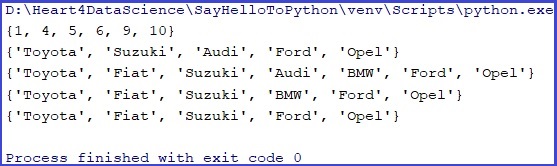

Now I will try to add one set to another in the same way I used to do it with lists and tuples:

St3 = St1+St2
print(St3)

We got error. Need to use some function.
St3 = St1.union(St2)
print(St3)
#adding list elems to set
St3 = {1,3,5,7,9}
Lst = [2,4,6,8]
St3.update(Lst)
print(St3)

#or
St4 = St3.union(Lst)
print(St4)

DICTIONARIES

Dct1 = {}
Dct2 = dict(one=1,two=2,three=3)
Dct3 ={"one":1, "two":2, "three":3}

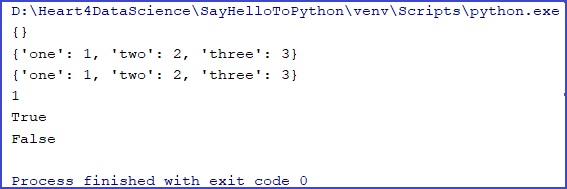
print(Dct1)
print(Dct2)
print(Dct3)
#operations
print(Dct3["one"])
print("two" in Dct2)
print("five" in Dct3)
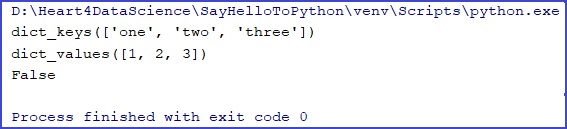
print(Dct3.keys())
print(Dct3.values())
print("jeden" in Dct3.keys())
#Loops
for x in Dct3.values():
    print(x)

for y in Dct3.keys():
    print(y)
Cos = {
    "brand": "Maybelline",
    "toxic": False,
    "cruelty-free": True,
    "exp_date": 2024,
    "model": 123458900,
    "name": 'mascara',
    "colors": ["black", "green", "blue"]
}

print(Cos)
print(type(Cos))
print(Cos['brand'])
print(Cos.values())
print(Cos.keys())
print(len(Cos))

El = Cos.get('model')
print(El)
Itm = Cos.items()
print(Itm)
print(Cos.items()[1:4])


#if we update using one value, previous element will be removed:
Cos.update({"colors":"yellow"})
print(Cos)

Cos.update({ "colors": ["black", "green", "blue", "yellow", "red"]})
print(Cos)

#removing
#The popitem() method removes the last inserted item:
Cos.popitem()
print(Cos)

del Cos['toxic']
del Cos['colors']
print(Cos)

Cos.clear()
print(Cos)

#Loops
for x in Cos:
  print(x)

for x in Cos:
    print(Cos[x])  #values as a result

#to get keys only:
for x in Cos.keys():
    print(x)

#to get all data from out Dictionary:
for x, y in Cos.items():
    print(x, y)
    
#Copy
CopyDict = dict(Cos)
print(CopyDict)

#Dict inception
mycosm = {
  "cosm1" : {
    "name" : "Mascara",
    "exp_date" : 2023
  },
  "cosm2" : {
    "name" : "Lipstick",
    "exp_date" : 2025
  },
  "cosm3" : {
    "name" : "Face Powder",
    "exp_date" : 2024
  },
}

#or
cosm1 = {
    "name" : "Mascara",
    "exp_date" : 2023
}
cosm2 = {
    "name" : "Lipstick",
    "exp_date" : 2025
}
cosm3 = {
    "name" : "Face Powder",
    "exp_date" : 2024
}

mycosm = {
    "cosm1" : cosm1,
    "cosm2" : cosm2,
    "cosm3" : cosm3
}


print(mycosm)
Tuples & lists

Tuples

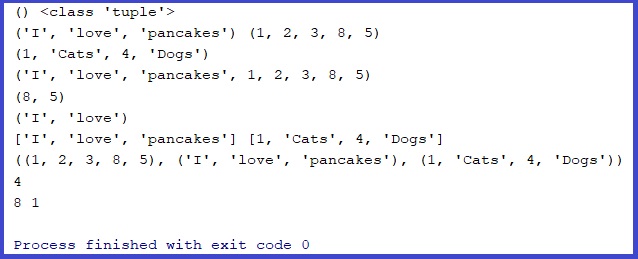
In Python tuples are written with round brackets as a collection of ordered and immutable comma-separated objects.

#tuples
Tpl0 = ()
Tpl1 = ('I', 'love', 'pancakes')
Tpl2 = (1,2,3,8,5)
Tpl3 = 1,"Cats", 4, "Dogs"
TplAll = Tpl2,Tpl1,Tpl3

print(Tpl0, type(Tpl0))
print(Tpl1, Tpl2)
print(Tpl3)

First tuple is empty. Might be strange but this option will be use, f.e. if we want to import data from file into tuple expression. Tuples might be string, numeric or mixed. Might be added, indexed, converted. A tuple is a collection which is ordered and unchangeable.

#operations
print(Tpl1 + Tpl2)
print(Tpl2[3:])
print(Tpl1[:2])
print(list(Tpl1), list(Tpl3))
print(TplAll)
print(sorted(Tpl3))
print(len(Tpl3))
print(max(Tpl2), min(Tpl2))
print(TplAll.count(1))  #output : 2 
print(Tpl2.index(8) #output: 4
print("sum values of Tpl2: ", sum(Tpl2))

#to add values to exisitng tuples
tpl = ("apple", "banana", "cherry")
y = ("orange", "raspberry",)
tpl1 +=y
print(tpl1)

#to update values
y = list(Tpl3)
y[2] = "and"
x = tuple(y) #output: 1,"Cats", and, "Dogs"

print(x)

We can also delete tuples:

del Tpl1
print(Tpl1 + Tpl2)

[Un]Pack

# tuple (un)packing
Tpl4 = 5, 6, 7
print(Tpl4)
x1, x2, x3 = Tpl4

print("Val1 = " + str(x1))
print("Val2 = " + repr(x2))
print("Val3 = " + str(x3))

fruits = ("apple", "banana", "cherry")

(green, yellow, red) = fruits

print(green)
print(yellow)
print(red)

fruits = ("apple", "banana", "cherry", "strawberry", "raspberry")

(green, yellow, *red) = fruits

print(green)
print(yellow)
print(red)

fruits = ("apple", "mango", "papaya", "pineapple", "cherry")

(green, *tropic, red) = fruits

print(green)
print(tropic)
print(red)

Loops:

#Loop
Tpl5 = ("one", "two", "three")
for x in Tpl5:
  print(x)

LISTS

A list in Python is a collection that can be compared to arrays in other programming languages. An important feature of lists is that they can store different types of data.

#lists
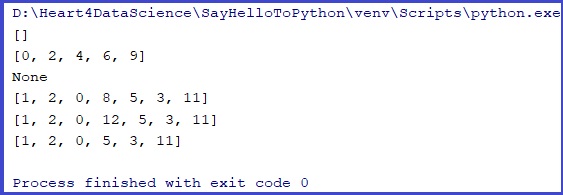
tpl = 1,2,9,7,8
lst = list(tpl)

print(tpl)
print(lst)
print(type(tpl))
print(type(lst))


Lst1 = []
Lst2 = list((1,2,3))
Lst3 = [1,2,0,8,5,3]
Lst4 = ["abc", 5, "Jimmy", 4.8]

print(Lst1)
print(Lst2)
print(Lst3)
print(Lst4)

We can make similar operations on lists like on tuples

#operations
Lst5 = Lst1+Lst2
Lst6 = [Lst3,Lst4]
Lst4.extend(Lst2)
Lst1.insert(1,1)
Lst1.clear


X = [9, 4,]
Lst2 +=X
print(Lst2)

Tpl1 = (33,44,55)
Lst1.extend(Tpl1)
print(Lst1)

We can add, change or remove data inside

Lst7 = [6, 9, 4, 2, 0]
Lst7.clear()
print(Lst7)
del Lst7

Lst7 = [6, 9, 4, 2, 0]
Lst7_sorted = Lst7.sort()
print(Lst7)
print(Lst7_sorted)

print("sum values of Lst3: ", sum(Lst3))

Lst3.append(11)
Lst3.append(99)  #cannot add more than one elem with append function
print(Lst3)
Lst3[3] = 12
print(Lst3)
Lst3.pop(3)
print(Lst3)
1. Clear return empty list,
2. to sort the list we need to declare another var.
3. Changes in list
#removing duplicates
L1 = [1,3,7,4,3]

#check for duplicates
if len(L1) != len(set(L1)):
    print("duplicates exist")
else:
    print("no duplicates")

#method1
unique = []
for x in L1:
    if x not in unique:
        unique.append(x)

print(unique)
unique.sort()
print(unique)

#method2
seen = set()
unique = []

for x in L1:
    if x not in seen:
        seen.add(x)
        unique.append(x)

print(unique)

Loops:

#loops
List1 = ["white", "blue", "green"]
for x in List1:
  print(x)

List2 = [33,89,45,0]
for y in List1:
  print(y)
#join
L1 = [1,2,3]
L2 = [4,5,6]

print(L1,L2)
print(L1+L2)

for x in L2:
    L1.append(x)
print(L1)

L2.extend(L1)
print(L2)

Nested lists

#nested list
numbers = [[0,1,2],[3,4,5],[6,7,8]]
print(numbers)

#with loop
for list in numbers:
        print(list)

''' output:
[0, 1, 2]
[3, 4, 5]
[6, 7, 8] '''

for list in numbers:
        print(numbers)

'''output:
 [[0, 1, 2], [3, 4, 5], [6, 7, 8]]
[[0, 1, 2], [3, 4, 5], [6, 7, 8]]
[[0, 1, 2], [3, 4, 5], [6, 7, 8]] '''

# with rows and columns
print("   A  B  C")
counter = 0
for line in numbers:
    print(counter, line)
    #counter = counter + 1 #method1
    counter += 1

'''   output:     
   A  B  C
0 [0, 1, 2]
1 [3, 4, 5]
2 [6, 7, 8] '''

#with index
numbers[0][1] = 9
numbers[1][1] = 9
numbers[2][1] = 9
print("   A  B  C")
for counter, list in enumerate(numbers):
    print(counter, list)

''' output:
0 [0, 9, 2]
1 [3, 9, 5]
2 [6, 9, 8]  '''

#as def
def numbers_board(your_number = 0, row = 0, column = 0):
        print("   A  B  C")
        numbers[row][column] = your_number
        for count, row in enumerate(numbers):
                print(count,row)

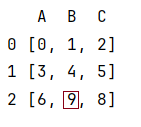
numbers_board(your_number=9, row=2, column=1)

a result for function numbers_board

#comrehension

S = [[i for i in range(11)] for i in range(3)]

print(S)

[[0, 1, 2, 3, 4, 5, 6, 7, 8, 9, 10], [0, 1, 2, 3, 4, 5, 6, 7, 8, 9, 10], [0, 1, 2, 3, 4, 5, 6, 7, 8, 9, 10]]