Today I will show you, how can we count data according specific criteria and How can we sum values regarding chosen condition.
1. Count By Font Color
Function CountByFColor(range_data As Range, criteria As Range) As Long
Dim xData As Range
Dim xcolor As Long
xcolor = criteria.Font.Color

For Each xData In range_data
If xData.Font.Color = xcolor Then
CountByFColor = CountByFColor + 1
End If
Next xData
End Function
2. Count By Interior Index Color
Function CountByRcolor(range_data As Range, criteria As Range) As Long
Dim xData As Range
Dim xcolor As Long
xcolor = criteria.Interior.ColorIndex

For Each xData In range_data
If xData.Interior.ColorIndex = xcolor Then
CountByRcolor= CountByRcolor+ 1
End If
Next xData
End Function
3. Count By Value
Function CountByValue(range_data As Range, criteria As Range) As Long
Dim xData As Range
Dim xValue As String
xValue = criteria.Value

For Each xData In range_data
If xData.Value = xValue Then
CountByValue = CountByValue + 1
End If
Next xData
End Function
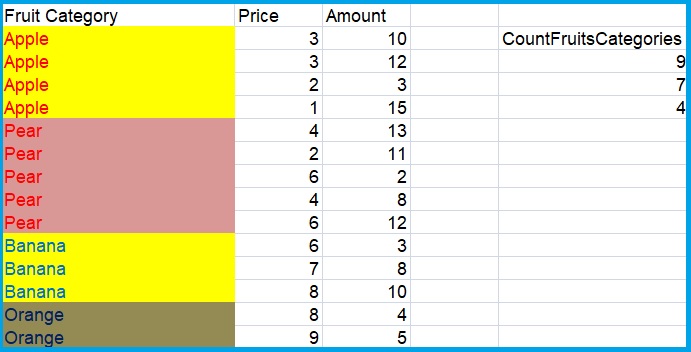
Check result
Enter following functions under CountFruitCategories:
=CountByFColor(A2:A15;A2)
=CountByRcolor(A2:A15;A2)
=CountByValue(A2:A15;A2)
Sum by criteria
Let’s say we would like to sum Prices and Amount reagrding Fruit Types. Write a code in VBA:
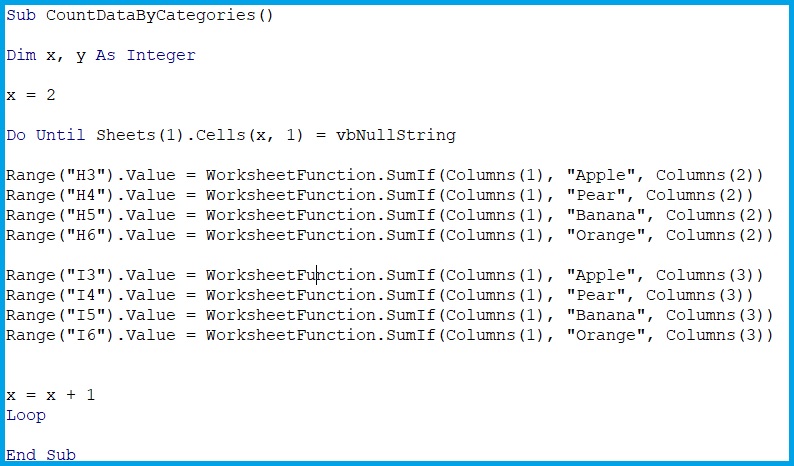
Range("H3").Value = WorksheetFunction.SumIf(Columns(1), "Apple", Columns(2))
Range("H4").Value = WorksheetFunction.SumIf(Columns(1), "Pear", Columns(2))
Range("H5").Value = WorksheetFunction.SumIf(Columns(1), "Banana", Columns(2))
Range("H6").Value = WorksheetFunction.SumIf(Columns(1), "Orange", Columns(2))
We can also declare an one-dimensional table, like this:
Dim Frts(3) as String
Frts(3) = “Apple”
Frts(2) = “Pear”
Frts(1) = “Banana”
Frts(0) = “Orange”
Range(“E3”).Value = WorksheetFunction.SumIf(Columns(1), Frts(3), Columns(2))
Range(“E4”).Value = WorksheetFunction.SumIf(Columns(1), Frts(2), Columns(2))
….
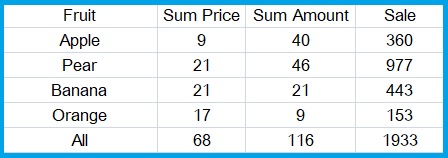
result
 Heart4DataScience