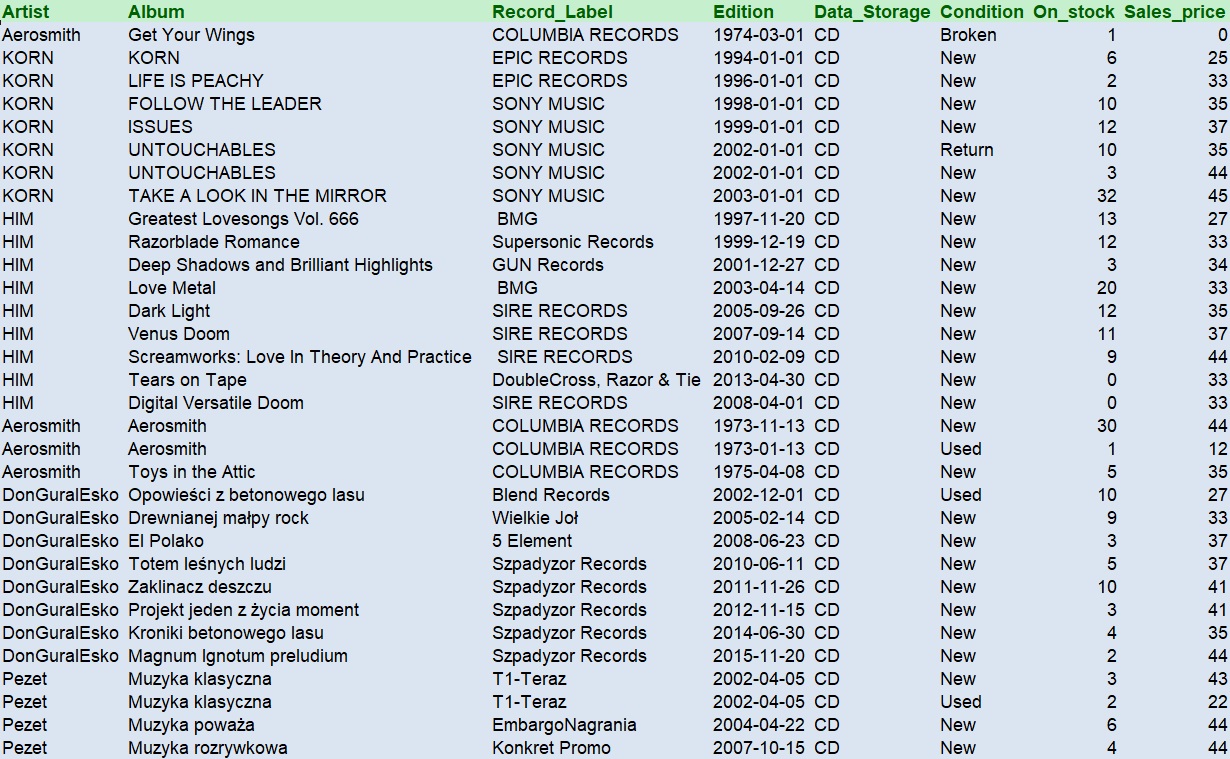
Autofilter is a method to present data in smaller circle of the whole database. Let’s say we have full table of various product with prices and we would like to show in next sheet the result for all positions contains chosen name or price of the product. We can make an example with our table Products, already exported to Excel . From the table i would like to create autofilter for Korn album in Rock sheet and Hip-hop albums cheaper then 35 PLN.
Cells.Select
Cells.EntireColumn.AutoFit
Columns("A:A").Select
Selection.AutoFilter
Rows("1:1").Select
Selection.AutoFilter
Selection.AutoFilter
ActiveSheet.Range("$A$1:$I$54").AutoFilter Field:=2, Criteria1:="KORN"
Range("A1:I9").Select
Selection.Copy
Sheets("ROCK").Select
ActiveSheet.Paste
Cells.Select
Cells.EntireColumn.AutoFit

ActiveSheet.Range("$A$1:$I$54").AutoFilter Field:=2, Criteria1:= _
"=DonGuralEsko", Operator:=xlOr, Criteria2:="=Pezet"
ActiveSheet.Range("$A$1:$I$54").AutoFilter Field:=9, Criteria1:="<35", _
Operator:=xlAnd
Range("B1:I47").Select
Selection.Copy
Sheets("HH").Select
Range("A1").Select
ActiveSheet.Paste
Cells.Select
Cells.EntireColumn.AutoFit
Range("A1").Select
Shell: you have already seen examples to open or save dedicated file with various extenstion in my previous posts. But here’s another option of VBA code, which is similar do CMD command. It’s a VBA Shell function. Try this by your own:
'open up a notepad
shell1 = Shell("notepad")
'open up Ms Access
shell2 = Shell("msaccess")'Excel
shell3 = Shell("excel")
'direct path and file
shell4 = Shell("notepad C:\Users\user\Desktop\wyliczenie.txt")
shell5 = Shell("explorer.exe C:\Users\user\Desktop\wyliczenie.txt")
 Heart4DataScience